

Introduction
Businesses frequently work with large volumes of structured data stored in spreadsheets and CSV files. During system migrations, data transformations, software upgrades, or database consolidation, organizations often need to compare information from an older system with information from a new or target system.
Traditionally, this comparison process is performed manually using spreadsheet-based tools. Employees have to identify corresponding columns, match records, compare values, locate differences, and prepare reports. As the size of the datasets increases, this process becomes time-consuming and more vulnerable to human error.
CnEL India worked on a project concept focused on transforming an existing spreadsheet-based comparison process into a modern AI-powered web application. The objective was to create a simple interface where users could upload source and target files, automatically identify similar columns, validate mappings, compare records, and download detailed comparison results.
The proposed platform was designed to support structured data comparison while reducing manual effort and making differences easier to identify.
Project Background
The client already had an existing spreadsheet-based solution capable of comparing two structured files. While the existing solution provided useful functionality, the requirement was to convert this workflow into a dedicated web-based application with intelligent data mapping.
The new system needed to compare two primary files:
- File A – Legacy File
- File B – Target File
An optional third file could also be uploaded:
- File C – Mapping File
The legacy file represented the existing or source data, while the target file represented the new or expected data.
The mapping file could contain predefined relationships between source and target columns.
The objective was to allow users to upload these files and receive a structured comparison showing matching and mismatched information.
Project Objectives
The main objectives of the project included:
- Creating a web-based file comparison platform.
- Supporting spreadsheet and CSV-based data.
- Automatically identifying similar column names.
- Using AI to suggest column mappings.
- Allowing users to review and modify mappings.
- Supporting custom primary-key combinations.
- Accepting optional predefined mapping information.
- Comparing source and target records.
- Identifying matching and mismatched values.
- Highlighting differences clearly.
- Providing downloadable comparison results.
- Reducing manual data comparison effort.
The platform needed to be simple enough for business users while providing sufficient flexibility for complex data comparison scenarios.
File Upload Workflow
The first stage of the application was the file upload screen.
Users needed to upload the legacy and target files before beginning the comparison process.
The interface was designed around three possible inputs:
File A: Legacy or source data.
File B: Target or destination data.
File C: Optional mapping information.
The third file was optional because users could either allow the system to identify mappings automatically or provide their own mapping information.
Once the primary files were uploaded, the application could begin analyzing their structure.
Initial Data Analysis
After uploading the files, the system needed to perform an initial analysis.
This analysis could include basic counts and structural information from both datasets.
For example, the application could determine:
- Number of rows
- Number of columns
- Column headers
- Available records
- Potential primary-key fields
- Basic structural differences
Displaying these initial counts provides users with immediate visibility into the datasets before comparison begins.
It can also help identify obvious differences, such as one file containing significantly more records than the other.
AI-Based Column Matching
One of the most important features of the platform was intelligent column matching.
Different systems often use different names for the same type of information.
For example, one file might contain a column called:
first_name
while the target file might use:
First Name
A simple exact-name comparison would treat these as different columns.
An AI-based matching process can understand that both fields represent the same concept and suggest them as a match.
The system would analyze column names and their meaning to create an initial mapping between File A and File B.
Other examples could include:
- customer_id → Customer ID
- phone_no → Phone Number
- email_address → Email Address
- dob → Date of Birth
- company_name → Company Name
This intelligent mapping significantly reduces the manual effort required from users.
Human Validation of AI Suggestions
Although AI can provide useful mapping suggestions, business users may still need control over the final mapping.
Therefore, the application was designed to allow users to review AI-generated mappings.
The mapping screen could display:
- Source column
- Suggested target column
- Mapping confidence or relevance
- User approval
- Ability to change the target column
- Ability to leave a field unmapped
This creates a human-in-the-loop workflow.
The AI handles the initial repetitive work, while the user remains responsible for validating important mappings.
This approach provides both efficiency and control.
Custom Primary Keys
Primary keys are important for comparing records between two datasets.
The project initially assumed that the first column in both files could be used as the primary key. However, real-world datasets are not always structured this way.
Sometimes a single field is not sufficient to uniquely identify a record.
For example, a record might need to be identified using a combination of:
- Company ID
- Employee ID
- Location
- Account Number
Therefore, the platform needed to support custom primary-key combinations.
Users could select one or more columns to create an override primary key.
This provided greater flexibility when comparing datasets with different structures.
Mapping File Support
The platform also needed to support an optional mapping file.
Some organizations may already have predefined relationships between source and target fields.
Instead of manually creating these mappings again, users could upload a mapping sheet containing source-to-target relationships.
The system could then consume this information and include it within the mapping workflow.
This feature was especially useful for repeated migrations or comparison processes where mapping information had already been prepared.
It also reduced duplicate manual work.
Data Comparison Process
Once the mappings and primary-key configuration were confirmed, the comparison process could begin.
The system would use the selected key information to identify corresponding records between the legacy and target datasets.
For each matched record, the application would compare the mapped values.
The comparison could identify:
- Matching values
- Different values
- Missing records
- Additional records
- Unmapped fields
- Records requiring attention
This created a structured view of the relationship between the two datasets.
All Match and Unmatched Values
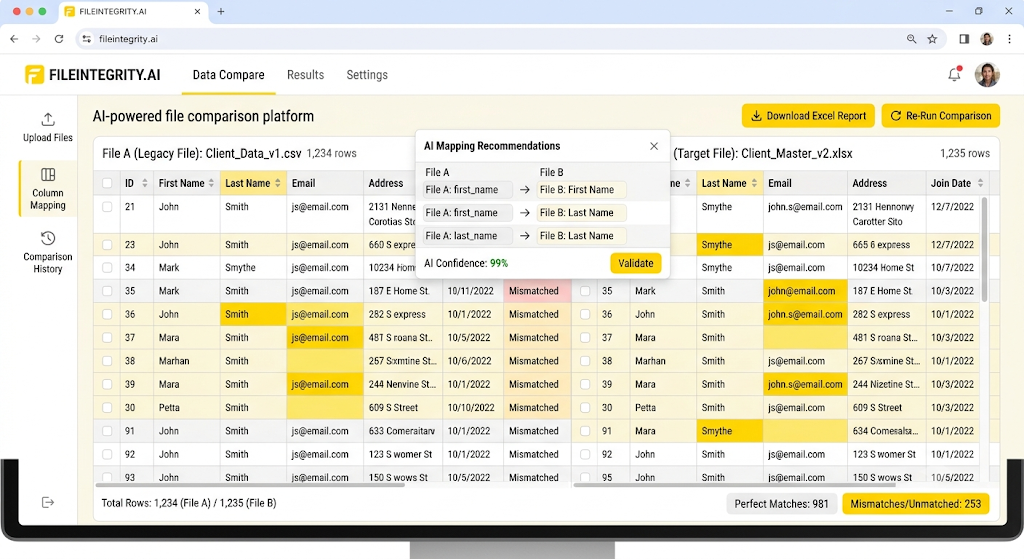
One of the primary output screens was designed to display both matching and unmatched values.
The comparison results could be presented side by side.
For example:
| Legacy Value | Target Value | Result |
| John | John | Match |
| Delhi | Jaipur | Mismatch |
| 1001 | 1001 | Match |
This format makes it easier for users to understand exactly where the two datasets differ.
The system could highlight mismatched values visually so that users could identify problems quickly.
Unmatched Values Screen
The second major output screen focused only on records containing mismatched values.
Instead of requiring users to review the entire dataset, the application could filter the results and show only the rows that require attention.
This can significantly reduce review time for large datasets.
For example, if two files contain thousands of records but only a small percentage have differences, users can immediately focus on those records.
This makes the comparison process much more efficient.
Difference Highlighting
Clear identification of mismatches was an important requirement.
Any values that differed between the legacy and target datasets could be highlighted in red.
The same highlighting approach could also be applied to the downloadable comparison file.
This provides a visual indication of where corrections or investigation may be required.
The purpose was not simply to report that a difference exists, but to show exactly where the difference occurs.
Downloadable Comparison Reports
The application also needed to provide downloadable comparison results.
Users could download the comparison data into a spreadsheet format for further analysis, sharing, documentation, or record keeping.
The downloaded report could contain:
- Source values
- Target values
- Comparison status
- Primary-key information
- Mismatch indicators
- Relevant mapped fields
Mismatched values would remain clearly highlighted in the downloaded output.
This made the web application useful not only for immediate review but also for downstream business processes.
Handling Different Dataset Structures
Real-world source and target files may not have identical structures.
One file may contain additional columns, different naming conventions, or different field arrangements.
The platform therefore needed to separate column mapping from record comparison.
This allowed users to explicitly define which source fields corresponded to which target fields.
Fields without a valid mapping could be excluded from the comparison rather than causing the entire process to fail.
This flexible structure made the system more suitable for migration and transformation projects.
Data Accuracy and Validation
Data comparison is only useful when the results are reliable.
The platform therefore needed validation mechanisms at multiple stages.
During file upload, the application could verify whether the files were readable and structurally valid.
During mapping, users could review suggested relationships.
During comparison, the system could verify that primary keys were available and that corresponding records could be identified.
This layered validation reduced the risk of misleading comparison results.
User-Friendly Interface
Although the underlying comparison process could be complex, the user interface needed to remain simple.
The intended workflow could be presented as a series of clear steps:
Upload Files → Review Initial Counts → Map Columns → Select Primary Key → Run Comparison → Review Results → Download Report
This step-by-step approach makes the platform easier for non-technical business users.
Users do not need to understand the underlying data processing logic. They simply need to follow the workflow and review the results.
Security and Data Handling
Since spreadsheet and CSV files can contain sensitive business information, secure data handling is an important consideration.
The application should be designed to protect uploaded files and comparison results.
Important considerations include:
- Controlled file access
- Secure upload handling
- Appropriate storage management
- User access controls
- Safe processing
- Protection against unauthorized downloads
- Appropriate deletion or retention policies
Data security is particularly important when the platform is used for business migrations or customer-related information.
Testing and Quality Assurance
The application required extensive testing because comparison accuracy was central to its purpose.
Testing could include:
- Identical files
- Files with different column names
- Missing columns
- Additional columns
- Missing records
- Additional records
- Multiple primary-key fields
- Duplicate primary-key values
- Mapping file usage
- Incorrect mappings
- Large datasets
- Empty fields
- Different data formats
- Matching values
- Mismatched values
- Downloaded reports
The objective was to ensure that the application could correctly identify differences without producing unnecessary false mismatches.
Challenges
One of the main challenges was creating intelligent column mapping.
Different organizations use different naming conventions, abbreviations, and terminology. The system therefore needed to provide useful suggestions while still allowing users to correct them.
Another challenge was designing flexible primary-key handling because a single field may not always uniquely identify a record.
Large datasets also require efficient comparison processing so that users do not experience unnecessary delays.
Finally, the application needed to balance automation with human validation. Fully automated mapping could create risks if an incorrect relationship was selected, while completely manual mapping would reduce the value of the AI capability.
CnEL India’s Approach
CnEL India’s approach focused on combining intelligent automation with user control.
The overall workflow can be summarized as:
Upload → Analyze → Suggest → Validate → Map → Compare → Highlight → Export
The system automates repetitive data analysis while allowing the user to make final decisions where business understanding is required.
This approach makes the platform practical for real-world data migration and validation scenarios.
Business Benefits
An AI-powered file comparison platform can provide significant benefits to organizations.
Reduced Manual Effort
Users no longer need to manually compare large spreadsheets cell by cell.
Faster Data Validation
Automated comparison can process large amounts of information more efficiently.
Intelligent Mapping
AI-based suggestions can reduce the time required to identify corresponding fields.
Better Accuracy
Structured comparison reduces the possibility of human oversight.
Easy Issue Identification
Highlighted mismatches make problems easier to locate.
Focused Review
The unmatched-only screen allows users to focus on records that actually require attention.
Better Reporting
Downloadable comparison files provide a useful record for further review and documentation.
Flexible Data Migration Support
Custom mappings and primary keys make the platform adaptable to different datasets.
Conclusion
This project demonstrates how AI and automation can transform a traditional spreadsheet-based data comparison process into a modern web application.
Instead of manually reviewing thousands of rows and determining which fields correspond to each other, users can upload their files, receive intelligent mapping suggestions, validate those mappings, define the appropriate primary key, and run an automated comparison.
The platform provides both complete comparison results and focused views of mismatched records, while downloadable reports make the results useful beyond the application itself.
CnEL India’s approach combines automation, intelligent data understanding, human validation, flexible mapping, and clear reporting to create a practical solution for organizations dealing with data migration and system transformation.
The result is a scalable foundation for improving data quality, reducing manual comparison work, and making complex file validation easier for business users.