
Project Overview
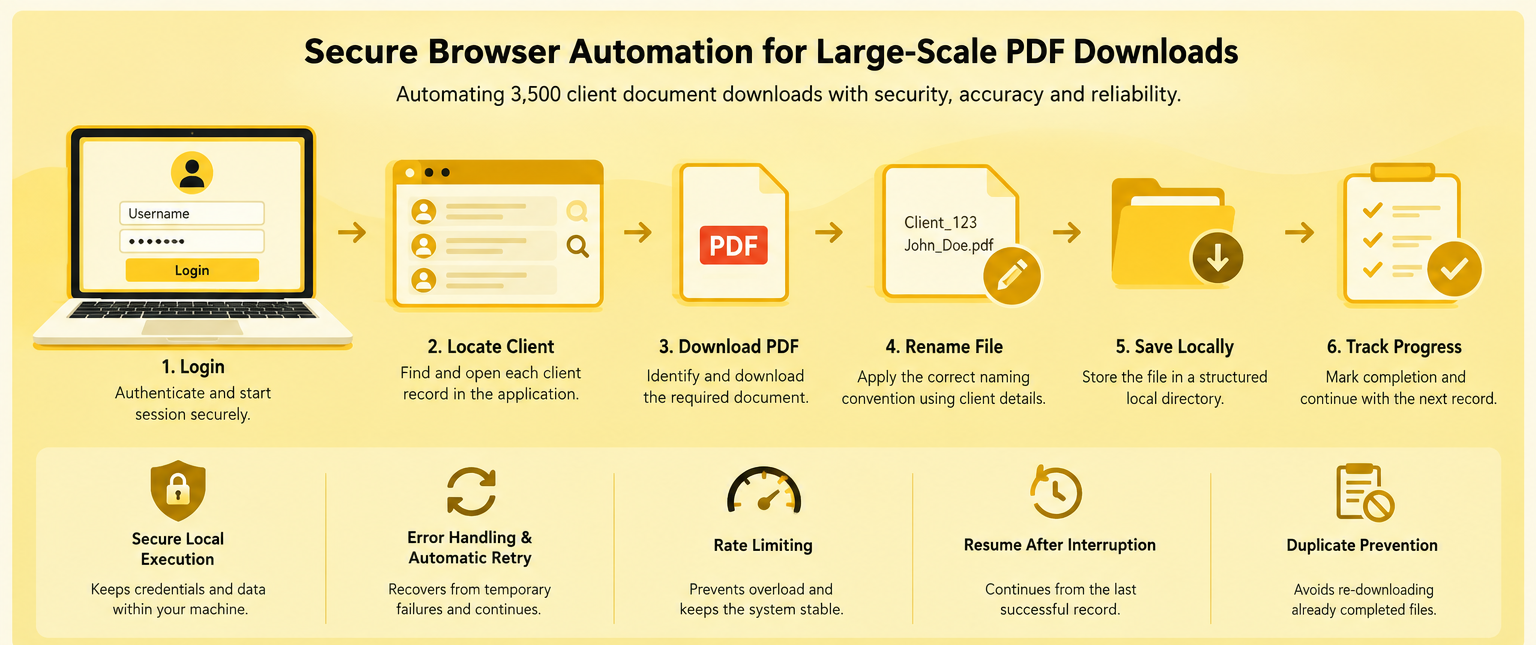
CnEL India worked on a secure browser automation and document migration project for a business that needed to download approximately 3,500 client PDF documents from a private web application.
The existing process required users to log into a custom web application, locate individual client records, open the relevant documents, download the PDF files, rename them according to client information, and organize them into a structured local directory.
Performing this process manually for thousands of documents would require significant time and introduce the possibility of human error. The client therefore required a reliable one-time automation solution that could systematically complete the download process while keeping sensitive client information completely confidential.
A key requirement was that the automation should run locally on the client’s own machine. No live login credentials or client database access would be provided to the development team. This created an important balance between automation efficiency and data security.
CnEL India approached the project by designing a locally executed browser automation workflow capable of handling authentication, navigation, document discovery, downloading, file naming, error recovery, progress tracking, and interruption recovery.
Business Challenge
Downloading a small number of documents manually is manageable. However, the situation becomes very different when thousands of files are involved.
The client needed to process approximately 3,500 PDFs. Each document was associated with specific client information, and the downloaded files needed to be stored using a consistent naming convention.
A manual workflow could create several challenges:
- Significant employee time spent on repetitive downloads.
- Risk of missing individual client documents.
- Incorrect file naming.
- Duplicate downloads.
- Inconsistent folder organization.
- Browser session interruptions.
- Failed page loads.
- Network-related download failures.
- Difficulty tracking completed and incomplete records.
- Repetition if the process had to be restarted.
The sensitive nature of the information added another layer of complexity.
Because the documents contained client data, the automation could not depend on transferring information to an external environment. The client specifically required the solution to run locally so that credentials and downloaded documents remained under their control.
The automation therefore needed to be designed around both operational reliability and data confidentiality.
Project Objectives
CnEL India structured the solution around several key objectives:
- Automate the login and authenticated browsing process.
- Maintain the user’s authenticated session during the operation.
- Locate and download approximately 3,500 PDF documents.
- Automatically identify relevant client information from each page.
- Rename documents using a defined naming convention.
- Store files in a structured local directory.
- Handle temporary page and network failures.
- Automatically retry failed operations where appropriate.
- Maintain progress so interrupted processes could resume.
- Avoid downloading the same document repeatedly.
- Keep credentials and client data entirely within the client’s environment.
- Deliver clean, documented, and maintainable source code.
- Provide a simple setup and execution guide.
The objective was not simply to create a script that could download files. The larger goal was to create a reliable workflow capable of processing thousands of records with minimal supervision.
Secure Local Execution
Security was one of the most important requirements of the project.
The client explicitly stated that live credentials and access to the live client database would not be shared with the development team. Instead, development could be performed using dummy pages or through a supervised session to understand the structure of the application.
CnEL India designed the automation so that the final workflow could execute directly on the client’s machine.
This architecture provided several advantages.
The user’s login credentials remained within the client’s environment. The downloaded PDF documents were also saved directly to local storage rather than being transferred to a development environment.
This reduced unnecessary exposure of sensitive information and allowed the client to maintain control over the entire document-processing process.
The development workflow could use representative data and simulated pages to build and test the core logic without requiring access to confidential records.
Understanding the Custom Web Application
Because the target application was custom-built, the automation could not rely on assumptions about standard page structures.
The first stage involved understanding how the application behaved during the normal user workflow.
The important areas included:
- Login page.
- Authentication process.
- Client listing or search interface.
- Individual client records.
- Document availability.
- Download controls.
- Client identification information.
- Navigation between records.
- Session behavior.
- Page loading behavior.
The automation needed to interact with dynamic elements rather than simply relying on fixed page positions.
This meant identifying stable page elements and designing the workflow around meaningful application states.
For example, the automation could determine that a client record had successfully loaded before attempting to locate the associated document. Similarly, it could verify that a download had actually completed before marking the record as successfully processed.
This state-based approach helped make the automation more reliable.
Authentication and Session Management
The automation needed to support standard username-and-password authentication while maintaining the authenticated session throughout the document download process.
A major concern with large automation jobs is session expiration.
If an automated process is expected to operate for an extended period, the login session may eventually expire or become invalid. If the automation does not recognize this situation, it could continue operating on the wrong page or repeatedly fail.
CnEL India’s approach included session-aware logic that could recognize authentication problems and respond appropriately.
The process could distinguish between normal page-loading failures and situations where authentication needed to be restored.
Session information could also be maintained locally so that the workflow did not unnecessarily restart from the beginning after every interruption.
Document Download Workflow
The main workflow followed a structured sequence.
A typical process could be represented as:
Login → Locate Client → Open Record → Identify Document → Download PDF → Validate Download → Rename File → Save Locally → Record Completion → Continue
Each stage had a defined purpose.
After authentication, the automation would identify the next client record requiring processing.
The client record would then be opened and allowed to load completely before the system attempted to locate the relevant document.
Once the document was identified, the download process would begin.
After the file was successfully downloaded, the automation would determine the appropriate filename using the required client information.
The file could then be saved into the designated local directory.
Only after the download and storage process had been successfully completed would the record be marked as finished.
This approach prevented partially completed operations from being incorrectly treated as successful.
Automated File Naming
File organization was another important component of the project.
A large collection of files with generic names would make the final document library difficult to manage.
The client therefore required files to be renamed according to specific information associated with each record.
A naming pattern such as:
Client_ID_Client_Name.pdf
could provide a consistent structure.
For example, instead of storing files under generic names such as document.pdf, the automation could create names based on the relevant client information.
Before saving a file, the workflow needed to handle characters that may not be valid in local filenames.
It could also account for duplicate names by applying an appropriate naming strategy rather than accidentally overwriting an existing document.
This ensured that the resulting document collection was both organized and usable.
Structured Local Directory
The downloaded documents were also required to follow a predictable local folder structure.
A structured directory made it easier for the client to locate, archive, review, and manage the resulting files.
Depending on the client’s requirements, folders could be organized according to categories such as client groups, processing batches, dates, or other business classifications.
The important principle was consistency.
Every successfully processed document needed to follow the same storage rules so that thousands of files could be managed without additional manual organization.
Error Handling and Automatic Retry
Processing thousands of pages introduces a high probability of encountering temporary failures.
A page may take too long to load. A network connection may briefly fail. A document may not become available immediately. A browser operation may encounter an unexpected response.
Stopping the entire process because of one temporary problem would defeat the purpose of automation.
CnEL India therefore designed the workflow around controlled error handling.
When an operation failed, the automation could determine whether the failure was temporary and safe to retry.
A retry mechanism could then attempt the operation again after a short delay.
The number of retries could be limited to prevent the system from becoming trapped indefinitely on one problematic record.
If the problem continued, the workflow could record the failure and continue with other records where appropriate.
This approach improved overall reliability while maintaining visibility into unsuccessful operations.
Rate Limiting and Controlled Processing
Another important consideration was responsible interaction with the client’s web application.
A process downloading thousands of documents should not generate an unnecessarily high number of requests in a short period.
Controlled processing can reduce pressure on the application and make the automation more stable.
The workflow could therefore introduce appropriate pauses between operations and avoid unnecessary repeated requests.
This was particularly important because the target application was custom software and the client wanted the automation to operate reliably without disrupting normal system usage.
Resume After Interruption
One of the most valuable requirements was the ability to resume the process after an interruption.
A large document migration can take considerable time. Unexpected circumstances such as a computer restart, network interruption, browser failure, or manual stop should not force the entire process to begin again.
CnEL India addressed this through progress tracking.
The workflow could maintain information about which records had already been processed successfully.
When execution resumed, the automation could check existing progress and identify the remaining records.
This created a workflow such as:
3,500 total records → 1,800 completed → interruption → restart → continue from remaining records
rather than:
3,500 total records → interruption → restart all 3,500
This capability significantly improves the practical usefulness of large-scale automation.
Duplicate Prevention
Resume functionality also requires duplicate protection.
The automation needed to determine whether a document had already been successfully downloaded before attempting the operation again.
Existing local files could be checked against the expected naming structure and processing records.
If a document was already confirmed as complete, the automation could skip it.
This reduced unnecessary downloads and protected against accidental overwriting.
Validation and Quality Assurance
Downloading a file does not necessarily mean the process was successful.
A file could be incomplete, incorrectly named, empty, or saved in the wrong location.
CnEL India therefore considered validation as an important stage of the workflow.
The automation could verify that:
- A file was actually created.
- The file existed in the expected directory.
- The file had an appropriate extension.
- The download operation had completed.
- The expected naming structure was applied.
- The record was correctly marked as processed.
Testing was performed against representative scenarios to identify problems before the solution was used on the full dataset.
Testing with Dummy Data
Because the client could not provide live credentials or unrestricted access to confidential client information, the development process needed to work safely with non-sensitive data.
CnEL India could reproduce the relevant page structures using representative content.
This allowed the core automation logic to be tested without exposing actual client records.
Testing scenarios included:
- Successful login.
- Invalid login behavior.
- Client page loading.
- Document availability.
- Missing document situations.
- Slow page responses.
- Temporary failures.
- Download failures.
- Duplicate files.
- Invalid filename characters.
- Interrupted processing.
- Resume behavior.
- Large-volume processing.
This approach helped validate the workflow while respecting the client’s confidentiality requirements.
Clean Code and Documentation
The final solution also required a clean handover.
The automation code was structured so that the client could understand the major components and maintain the workflow if required.
Clear comments and organized functions helped separate responsibilities such as authentication, navigation, document discovery, downloading, file naming, progress tracking, and error handling.
A simple setup guide was also an important deliverable.
The guide could explain:
- Required software environment.
- Dependency installation.
- Configuration steps.
- Local folder setup.
- How to start the process.
- How to stop and resume the process.
- Where downloaded files are stored.
- How progress and errors can be reviewed.
The purpose was to make the final system practical for the client’s team rather than leaving them with an unexplained script.
Business Benefits
The completed automation approach offered several important benefits.
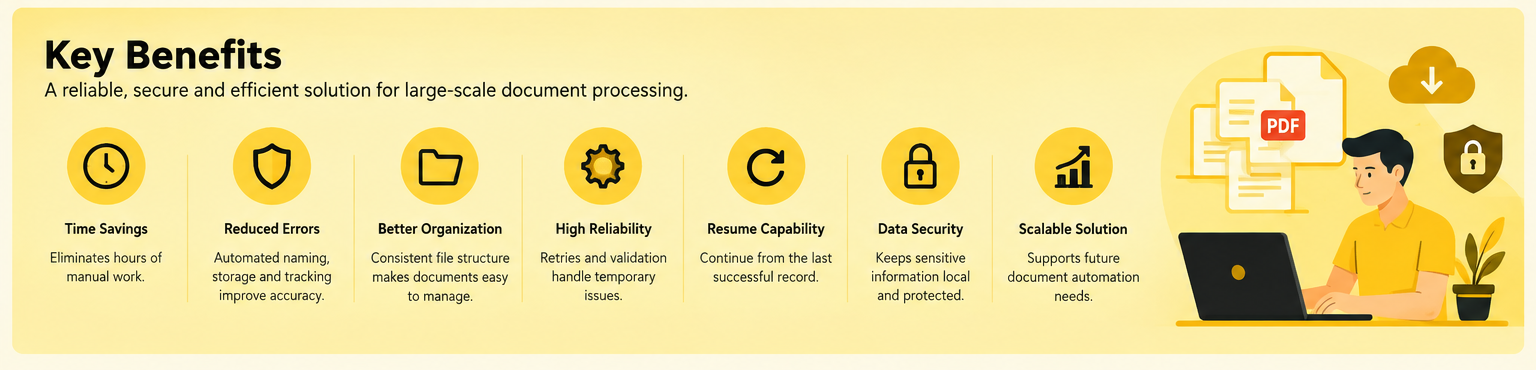
Significant Time Savings
Automating thousands of repetitive downloads can eliminate a substantial amount of manual work.
Reduced Human Error
Automated naming, storage, and progress tracking reduce mistakes associated with repetitive manual processing.
Improved Organization
Consistent file naming and folder structures make the final document collection easier to manage.
Better Reliability
Retry mechanisms and validation reduce the impact of temporary failures.
Resume Capability
The ability to continue from the last successful record prevents unnecessary reprocessing.
Improved Data Security
Running the automation locally allows sensitive credentials and documents to remain within the client’s controlled environment.
Scalable Workflow
Although the immediate requirement involved approximately 3,500 PDFs, the underlying architecture can support similar document-processing projects in the future.
CnEL India’s Contribution
CnEL India approached the project as a secure automation and data-processing challenge rather than simply creating a basic download script.
The solution considered the complete lifecycle of the operation—from authentication and navigation to document discovery, downloading, validation, naming, storage, progress tracking, and recovery.
Security was incorporated into the architecture from the beginning. Since the client did not want to share live credentials or confidential records, the development process was designed around representative data and supervised access where necessary.
This allowed CnEL India to build the required automation logic without unnecessarily exposing sensitive information.
Future Scalability
The same architecture can be extended to other document migration and administrative automation requirements.
Future versions could support additional document types, more advanced folder structures, detailed processing reports, scheduled execution, configurable retry policies, or expanded validation rules.
The workflow could also be adapted to other internal business systems where employees currently perform repetitive document collection tasks.
The core principle remains the same: automate repetitive browser-based operations while maintaining security, reliability, traceability, and control.
Conclusion
The secure PDF document automation project demonstrated how browser-based automation can transform a large and repetitive administrative process into a structured, reliable workflow.
The requirement involved approximately 3,500 client documents, making reliability and recovery just as important as basic automation.
CnEL India focused on creating a locally executed solution that could securely authenticate, navigate a custom web application, identify and download documents, rename files according to client information, organize them locally, handle temporary failures, prevent duplicates, and resume processing after interruptions.
The project also emphasized responsible handling of sensitive information. By keeping credentials and client documents within the client’s environment and using representative data during development, the solution could address the automation requirement without unnecessary exposure of confidential information.
Ultimately, the project provided a practical framework for large-scale document processing that combines automation efficiency with security, organization, error recovery, and maintainability.