

Introduction
Modern customer support teams depend heavily on web-based dashboards to manage conversations, customer information, tickets, tasks, and daily operations. When these dashboards are slow, confusing, or difficult to use, even simple support activities can become frustrating and time-consuming.
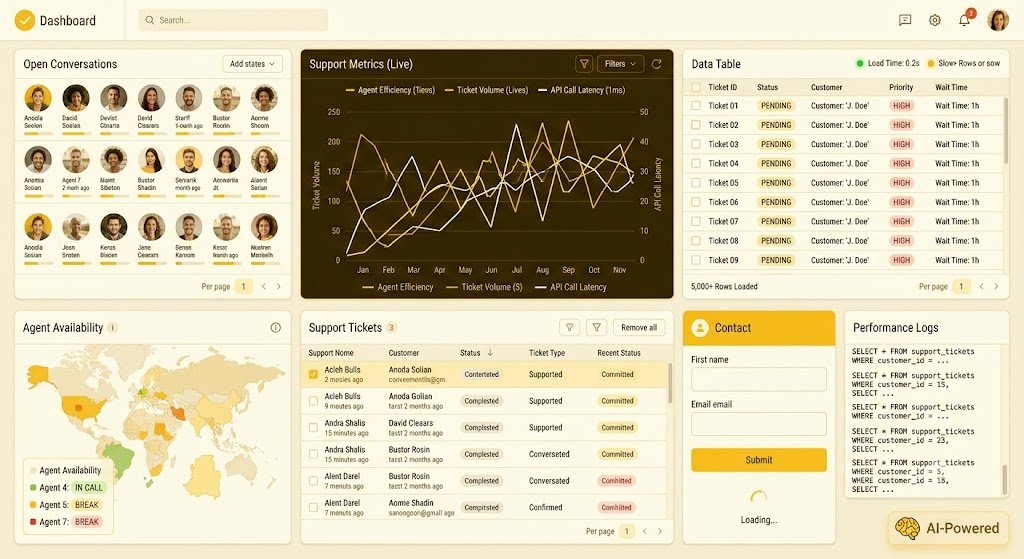
This case study focuses on a front-end development project for a desktop web application designed to be used extensively by customer support teams. The main objective was to build a clean, responsive, and high-performing interface that could work smoothly with real-world data while remaining simple for support agents who may spend several hours every day inside the application.
The project required more than creating visually attractive screens. The front-end needed to communicate effectively with backend services, manage different data states, support large datasets, handle unexpected situations, and provide users with immediate visual feedback during operations.
CnEL India approached this type of project with a user-first development philosophy: a dashboard should not simply display information. It should help users complete their work quickly, confidently, and with minimal unnecessary effort.
Understanding the Business Requirement
The application was intended for customer support professionals who work with large amounts of information throughout the day. Such users may have multiple browser tabs open, handle several customer requests simultaneously, and frequently move between tables, forms, filters, records, and dashboards.
For this reason, usability and performance were critical.
The requirement was to develop and improve screens for a desktop-based application while ensuring that the interface remained easy to understand even when the underlying data became complex.
The project involved several key requirements:
- Creating clean and professional dashboard screens.
- Converting designs and rough concepts into usable interfaces.
- Connecting front-end screens with backend data services.
- Handling loading, empty, success, and error conditions.
- Working effectively with large tables and datasets.
- Improving slow or data-heavy pages.
- Fixing interface problems discovered during testing.
- Ensuring that previously fixed issues did not return.
- Supporting responsive interactions and smooth navigation.
- Making forms reliable so users would not lose entered information.
- Understanding enough backend functionality to complete features end to end.
- Maintaining clean and maintainable code.
- Using AI-assisted development responsibly while manually reviewing and improving generated output.
The overall goal was to create an application that felt fast and reliable even when dealing with thousands of records.
The Challenge of Real-World Dashboard Development
One of the biggest challenges in dashboard development is the difference between a design prototype and a real application.
A design may look perfect when it contains only a few sample records. However, real users may encounter thousands of records, missing information, incorrect values, slow network responses, unexpected errors, and unusual combinations of filters.
Therefore, the project required a development approach based on real usage rather than only visual implementation.
For example, a table displaying five rows may look perfectly fine. But when the same table receives thousands of rows, loading everything simultaneously can make the page difficult to use.
Similarly, a button that works correctly under normal conditions may provide a poor experience if the user clicks it and receives no indication that an operation is in progress.
Forms present another common challenge. If a user spends several minutes entering information and the page unexpectedly refreshes or encounters an error, losing that information can create significant frustration.
These situations made state management, performance, error handling, and usability just as important as visual design.
Building Clean and Practical User Interfaces
The first focus of the project was creating interfaces that were visually clean and practical.
The objective was not to add unnecessary design elements. Instead, every component needed to support the user’s workflow.
For a customer support agent, important actions should be easy to identify. Frequently used controls should have predictable locations. Information should be grouped logically, and unnecessary visual distractions should be avoided.
CnEL India’s approach focused on creating interfaces where users could quickly understand:
- What information they were viewing.
- What action they could take.
- Whether an action was currently processing.
- Whether an operation was successful.
- Whether additional information was required.
- What went wrong if an operation failed.
This approach helped transform the dashboard from a simple information display into a practical working environment.
Connecting Screens With Real Data
A major part of the project involved connecting front-end screens to backend services.
The interface needed to work with actual application data rather than static examples. This meant designing each screen to properly respond to different data conditions.
For every major data-driven component, the interface needed to consider several states.
Loading State
When information was being retrieved, users needed clear visual feedback.
Instead of leaving the screen appearing inactive, the interface could communicate that information was being loaded. This prevents users from repeatedly clicking buttons or assuming that the application is not responding.
Empty State
Sometimes a search or filter may legitimately return no results.
Rather than displaying a blank screen, the application needed to explain the situation clearly and, where appropriate, guide the user toward the next action.
Error State
Unexpected problems can occur when retrieving or submitting information.
The interface therefore needed meaningful error handling so users could understand what happened and determine what to do next.
Success State
When users completed an action successfully, the interface needed to provide appropriate confirmation.
These different states made the application feel more predictable and reliable.
Making Large Data Tables Faster
Data-heavy tables were one of the most important areas of the project.
Customer support systems can contain large amounts of information. Loading thousands of records simultaneously can negatively affect performance and make it difficult for users to find what they need.
The development approach therefore focused on improving how large datasets were presented and processed.
Instead of treating every record as equally important at the same time, the interface could prioritize the information users actually needed.
Filtering, searching, sorting, pagination, and efficient data loading can significantly improve the experience of working with large datasets.
The objective was to make a page feel responsive even when the underlying dataset was large.
Performance was considered from the user’s perspective.
A technically functional page is not necessarily a good page if users have to wait unnecessarily for every interaction.
Improving Perceived Performance
Performance is not only about how quickly data is technically processed. It is also about how quickly the application feels to the person using it.
For example, if a user clicks a button and receives no visual response for several seconds, they may assume the application is broken.
A better interface communicates immediately that the requested action has started.
Similarly, unnecessary screen refreshes, repeated requests, inefficient rendering, and excessive data processing can make an otherwise capable application feel slow.
The project therefore emphasized both actual performance and perceived performance.
The interface was designed to reduce unnecessary waiting, provide feedback during operations, and keep interactions smooth wherever possible.
Working With Backend Requirements
Although the primary focus of the project was front-end development, some features required understanding backend behavior.
A modern application cannot always be completed by working exclusively on the interface.
Sometimes a new field is required from the backend. Sometimes a database query needs improvement because a particular screen is slow. In other situations, incorrect data may appear because information is being processed incorrectly somewhere between the database and the interface.
The development process therefore included the ability to investigate issues beyond the visible screen.
This end-to-end understanding helped reduce unnecessary handoffs and allowed problems to be solved more efficiently.
The objective was not to turn the front-end developer into a full backend specialist. Instead, it was to ensure that front-end requirements could be completed without becoming blocked by small backend changes.
Handling QA Feedback
Quality assurance played an important role in the project.
Even carefully developed interfaces can contain problems that are difficult to identify during initial development.
Testing can reveal issues such as:
- Incorrect spacing.
- Broken interactions.
- Unexpected data behavior.
- Missing validation.
- Incorrect error messages.
- Problems with large datasets.
- Unexpected behavior in unusual user flows.
- Performance issues.
- Inconsistent components.
The development process therefore included fixing reported issues and verifying that the fixes remained stable.
A key principle was that fixing a bug should not create another problem elsewhere.
This required careful testing after changes and attention to the wider application rather than focusing only on the individual issue.
Designing for Support Agents
The application was specifically designed for users who work with it throughout the day.
This changes the priorities of interface design.
A user who spends only a few minutes on a website may tolerate minor inconveniences. A support agent using the same system for several hours cannot.
Repeated unnecessary clicks, unclear navigation, difficult-to-find controls, and slow interactions can accumulate into significant productivity losses.
CnEL India’s approach therefore considered the daily workflow of support professionals.
Frequently used functions should remain easy to access. Information should be organized in a predictable way. Visual hierarchy should help users understand what deserves attention.
Small usability improvements can have a significant impact when repeated hundreds of times during a working day.
Responsible Use of AI in Development
Another important requirement of the project was the use of AI-assisted development.
AI can help developers move faster by generating code, suggesting solutions, explaining unfamiliar concepts, and assisting with repetitive development work.
However, generated code cannot simply be accepted without review.
The project emphasized responsible AI usage.
Generated solutions needed to be checked for:
- Correctness.
- Security.
- Performance.
- Maintainability.
- Compatibility with the existing application.
- Unexpected side effects.
- Proper handling of edge cases.
The developer remained responsible for the final implementation.
This approach combines the productivity advantages of AI with traditional engineering discipline.
Building With Maintainability in Mind
A fast application is useful, but it also needs to remain maintainable.
Customer-facing applications continue to evolve. New features are added, requirements change, and business processes develop over time.
Poorly structured code can make every future change more expensive.
For this reason, the project focused on reusable components, consistent development practices, clear data handling, and logical separation of responsibilities.
Reusable interface components also help maintain visual consistency.
When similar actions appear in multiple parts of an application, users should not have to learn a different interaction pattern every time.
Testing With Realistic Scenarios
Testing was not limited to the ideal workflow.
The application needed to work with realistic and sometimes messy data.
Testing scenarios could include:
- Large datasets.
- Missing values.
- Empty results.
- Slow responses.
- Failed requests.
- Invalid user input.
- Repeated actions.
- Different filter combinations.
- Unexpected data formats.
- Long text values.
- Multiple simultaneous operations.
Testing these situations helped ensure that the application was prepared for real users rather than only demonstration scenarios.
CnEL India’s Development Approach
CnEL India approaches dashboard and web application development by combining usability, performance, reliability, and practical business requirements.
For a project like this, the development process can be summarized into several stages.
1. Understanding the User Workflow
Before implementation, the team studies how the application will actually be used.
The goal is to understand the most common tasks and identify areas where users may experience friction.
2. Converting Requirements Into Interfaces
Design concepts and rough ideas are transformed into functional screens.
The focus remains on simplicity, consistency, and ease of use.
3. Connecting Real Data
Interfaces are connected to real backend services so that screens behave like actual application components rather than static prototypes.
4. Handling Every Important State
Loading, empty, error, success, and unusual data conditions are considered during development.
5. Optimizing Performance
Data-heavy components and repeated operations are reviewed to identify unnecessary processing and improve responsiveness.
6. Testing and Fixing Issues
QA feedback is incorporated, and fixes are tested to ensure they do not introduce new problems.
7. Continuous Improvement
The application is reviewed from the user’s perspective so that future improvements can focus on real productivity gains.
Business Benefits
A well-designed customer support dashboard can provide several important business benefits.
Higher Productivity
When agents can find information quickly and complete actions with fewer clicks, they can handle more work during the same amount of time.
Better User Experience
Clear interfaces reduce confusion and help users feel more confident when performing important tasks.
Reduced Frustration
Fast responses, proper feedback, and reliable forms reduce the frustration associated with slow or unpredictable applications.
Better Scalability
Designing for large datasets from the beginning makes the application better prepared for future growth.
Fewer Repeated Bugs
A structured QA and testing process helps prevent previously resolved problems from returning.
Easier Future Development
Maintainable code and reusable components make it easier to introduce new features later.
Improved Operational Efficiency
When customer support teams spend less time fighting with their software, more time can be spent helping customers.
Conclusion
This front-end development project demonstrates that building a successful dashboard requires much more than translating a design into code.
The real challenge is creating an application that remains fast, understandable, reliable, and useful when exposed to real users and real data.
For customer support teams, these factors are especially important because the application becomes part of their everyday workflow.
CnEL India’s approach focuses on building interfaces that work beyond the happy path. Loading states, empty results, errors, large datasets, backend dependencies, QA findings, and performance challenges are all treated as important parts of the product experience.
The project also highlights the importance of combining modern development practices with responsible AI-assisted development. AI can accelerate engineering work, but professional judgment, testing, review, and accountability remain essential.
Ultimately, the goal is simple: build software that helps people work better.
A successful dashboard should not make users think about the technology behind it. It should allow them to focus on their actual job.
When an application feels fast, behaves predictably, handles real-world data gracefully, and makes everyday tasks easier, the technology becomes almost invisible—and that is often the strongest sign of good front-end engineering.
CnEL India continues to apply this practical approach to web applications, dashboards, automation solutions, and custom software projects where performance, usability, and reliability are critical to business success.