
Introduction
Email remains one of the most common ways to receive customer inquiries, complaints, requests, and important case-related information. However, managing these emails manually can become difficult when multiple messages need to be reviewed, organized, tracked, and resolved.
Important emails can get buried in an inbox, follow-up messages can be overlooked, and it can become challenging to remember which issues have been resolved and which still require attention. Searching through old conversations also takes time, especially when users need to find a particular case by its subject, sender, date, or status.
This case study focuses on developing a simple, personal case management system that connects to an email account and automatically converts selected incoming emails into organized cases.
The objective is to create a practical application that automatically captures relevant emails, assigns unique case numbers, stores important message details, and allows the user to manage issues from a centralized dashboard.
CnEL India’s approach to this type of project emphasizes simplicity, affordability, secure email integration, and ease of use. The system should help a non-technical user manage daily case-related work without requiring complicated setup or extensive technical knowledge.
Understanding the Business Requirement
The primary requirement was to build a lightweight case management application for personal use.
The user receives emails from specific sender addresses and wants those messages to become trackable cases automatically. Instead of manually copying information into spreadsheets or maintaining separate notes, the system should handle the repetitive work and keep all relevant details in one place.
The main requirements included:
- Securely connecting to the user’s email account.
- Monitoring emails from selected sender addresses.
- Automatically creating a new case for each qualifying email.
- Assigning a unique case number to every new case.
- Saving the sender, subject, received date, email body, and attachments.
- Allowing users to add issue descriptions and personal notes.
- Updating case status as work progresses.
- Searching and filtering cases using multiple criteria.
- Displaying all cases in a simple dashboard.
- Providing an interface suitable for both desktop and mobile devices.
Additional requirements included grouping replies from the same email conversation under an existing case, managing tracked sender addresses without code changes, and notifying the user when new cases are created.
The system also needed to be affordable to host and maintain, with a clear explanation of any recurring expenses.
Challenges of Manual Email Management
Email is designed primarily for communication, not structured case tracking.
When a person manages cases directly through an inbox, several problems can arise.
Important Messages Get Lost
As new emails arrive, older messages move down the inbox. A message requiring action may be overlooked simply because it is no longer visible near the top.
Case Information Is Scattered
The subject, sender, message history, attachments, and notes may be spread across different conversations or documents.
This makes it difficult to understand the complete history of a case quickly.
Follow-Ups Become Difficult
A case may remain open for several days or require multiple follow-ups. Without a clear status and notes, the user may forget what has already been done.
Searching Takes Too Long
Finding a case using only email search can be difficult when several conversations have similar subjects or when the relevant issue is described differently in the message body.
Manual Data Entry Creates Errors
Copying email information into a spreadsheet or separate tracking document introduces repetitive work and increases the possibility of missing or incorrectly entering information.
The proposed system addresses these challenges by transforming incoming emails into structured, searchable case records.
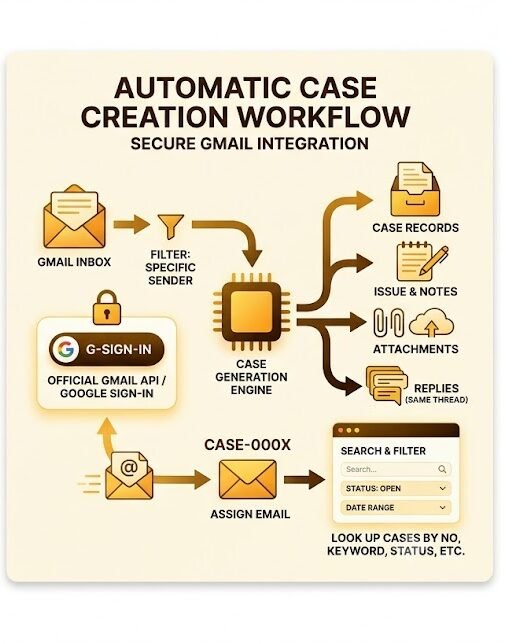
Secure Email Integration
The foundation of the system is a secure connection to the user’s email account.
The application should use the official email authorization process so the user can grant the required permissions without sharing their password directly with the application.
Only the permissions necessary for the intended functionality should be requested.
For example, the application may need permission to read selected email information, identify messages from tracked senders, retrieve attachments, and maintain case records.
The implementation should follow appropriate authorization, token storage, and access-control practices.
Because email messages and attachments may contain sensitive information, the system should also protect stored data and prevent unauthorized access.
The user should be able to understand what information the application accesses and why.
Automatically Creating Cases From Emails
One of the most important features is automatic case creation.
The user defines one or more sender addresses that should be monitored. When a qualifying email arrives, the system processes the message and creates a case record.
For example, a new email from a tracked address might generate the case number CASE-0001. The next qualifying email would receive the next available number.
Each case should have a unique identifier that remains consistent throughout its lifecycle.
The system should capture the main email information automatically, including:
- Unique case number.
- Date and time received.
- Sender address.
- Email subject.
- Full email body.
- Available attachments.
- Original message reference.
This reduces manual data entry and provides a structured record of the incoming request.
The case creation process should also be designed to avoid duplicate records when an email is encountered more than once during synchronization.
A reliable implementation can use the original message identifier and other relevant email metadata to determine whether a message has already been processed.
Managing Case Details
After a case has been created, the user needs to add information that may not be present in the original email.
The system therefore provides editable case fields.
Issue Description
The user can summarize the actual problem or request in their own words.
An email subject might be vague, but an issue description can clearly explain what needs to be addressed.
Case Status
Each case can have one of three main statuses:
- Open: The case has been received and requires attention.
- In Progress: Work is currently being performed.
- Closed: The issue has been resolved or no further action is required.
These statuses provide a quick overview of the current workload.
Personal Notes
The user can add internal notes about follow-ups, decisions, actions taken, or additional information.
These notes help maintain continuity and reduce the need to revisit the entire email conversation whenever a case is opened.
Together, these fields turn a basic email record into a practical case management entry.
Managing Email Replies and Conversation History
An important optional feature is the ability to associate replies with an existing case.
Without this functionality, every reply in a long email conversation could potentially create a separate case, resulting in duplicate records and fragmented histories.
A better approach is to use the original email’s conversation or thread reference to identify related messages.
When a reply belongs to an existing case, the system can attach it to that case rather than creating a new one.
This allows the user to review the original email and subsequent replies from one place.
However, the system should also account for situations in which a reply arrives with incomplete or changed conversation information. Appropriate matching rules and duplicate checks can help reduce incorrect associations.
For a first version, the system can prioritize reliable case creation and then introduce more advanced conversation matching once the core workflow has been tested.
Managing Tracked Sender Addresses
The user should not need a developer to change which senders are monitored.
A simple settings page can allow the user to add, edit, enable, or remove sender addresses.
For example, the user might initially monitor two email addresses and later decide to add another.
The application should apply updated settings automatically to future incoming messages.
This makes the system more flexible and easier to maintain.
It also avoids the need to modify application code whenever the user’s case management requirements change.
The settings interface should remain straightforward, with clear labels and simple actions.
Search and Filtering
A centralized search page is essential when the number of cases grows.
The system should allow users to find cases using several criteria:
- Case number.
- Keyword.
- Issue description.
- Sender address.
- Received date or date range.
- Case status.
For example, a user should be able to find all open cases received during a particular week or search for a phrase mentioned in an issue description.
Search results should display the most useful information, including the case number, subject, sender, received date, and current status.
Opening a result should take the user directly to the full case details.
For a personal application, the search interface should avoid unnecessary complexity. A clear search field and a small set of filters may be sufficient for most daily tasks.
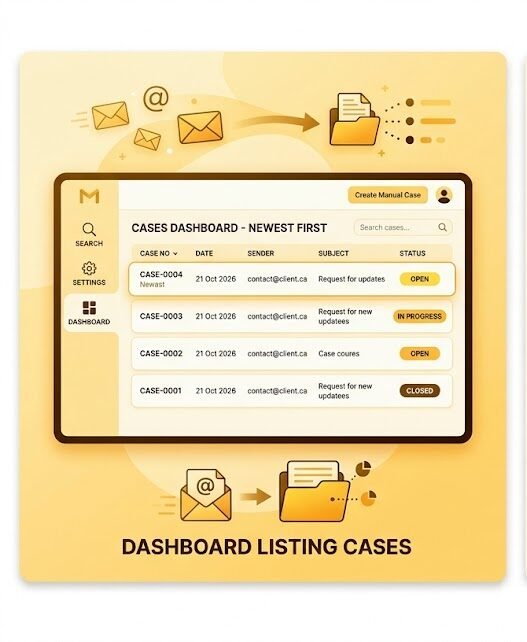
Dashboard and Case Overview
The dashboard serves as the central workspace of the application.
It should display all cases in a simple list, with the newest cases appearing first.
Each row can include the case number, email subject, sender, received date, and current status.
The dashboard can also include basic summary counts, such as the number of open cases, cases in progress, and closed cases.
These counts help the user understand the current workload at a glance.
Selecting a case should open a detailed view containing the original email, attachments, issue description, status, and personal notes.
The objective is to keep navigation simple so the user can move from reviewing new cases to updating existing ones with minimal effort.
Attachment Management
Emails may contain documents, images, reports, or other files relevant to a case.
The system should preserve these attachments and associate them with the correct case.
Depending on the selected hosting approach, attachments may be stored in a secure file storage location, while the case record maintains references to them.
The application should preserve file names and provide an easy way to access the associated files.
Security measures should ensure that attachments are not publicly accessible without authorization.
The implementation should also consider storage limits, file sizes, and permitted attachment types so that costs and risks remain manageable.
Notifications and Daily Workflow
Another useful feature is notifying the user when a new case is created.
Notifications can be delivered through email or displayed within the application.
For a personal system, the notification mechanism should be lightweight and should avoid sending repeated alerts for the same message.
The overall daily workflow could look like this:
- A qualifying email arrives.
- The application detects and processes the message.
- A new case number is assigned.
- The email information and attachments are associated with the case.
- The case appears at the top of the dashboard.
- The user reviews the message and adds an issue description or notes.
- The user updates the status as work progresses.
- The case is closed when the issue is resolved.
This workflow reduces repetitive work and makes case tracking more consistent.
Choosing an Affordable Technical Approach
Because the application is intended for personal use, the simplest suitable architecture is preferable to an unnecessarily complex system.
Two practical approaches can be considered.
Lightweight Workspace-Based Application
A lightweight application can use email integration, structured records, and a simple web interface.
This option may be appropriate when the number of cases is modest and the user needs basic search, status management, and limited customization.
Its advantages include a relatively simple setup, low maintenance requirements, and potentially low recurring costs.
However, attachment storage, email synchronization limits, and advanced search requirements must be evaluated before choosing this approach.
Small Custom Web Application
A custom web application provides more flexibility over the dashboard, search functionality, case history, attachment management, and future features.
It may be more suitable if the user expects the system to grow or requires more control over how cases are processed.
The trade-off is that development, hosting, backups, and maintenance may involve additional costs.
The final choice should depend on expected email volume, storage requirements, desired features, and the user’s budget.
No monthly cost should be assumed without evaluating the selected hosting and email integration arrangements. Some configurations may have little or no additional hosting expense, while others may require paid storage or infrastructure.
CnEL India’s Development Approach
CnEL India would approach this project in practical stages to reduce complexity and establish a reliable foundation.
Stage 1: Requirement Analysis
Confirm the tracked sender rules, case fields, status options, attachment requirements, and expected email volume.
Stage 2: Secure Email Connection
Implement the authorization process and verify that the application can retrieve the required email information safely.
Stage 3: Case Creation
Create unique case numbers, capture email details, and implement duplicate prevention.
Stage 4: Case Management Interface
Build the dashboard, case detail page, editing functions, notes, and status controls.
Stage 5: Search and Filtering
Add search by case number, keywords, issue description, date, sender, and status.
Stage 6: Testing
Test incoming messages, large email bodies, attachments, duplicate processing, synchronization failures, and different search combinations.
Stage 7: Walkthrough and Handover
Provide a practical walkthrough explaining how to connect the email account, manage sender addresses, update cases, search records, and troubleshoot common issues.
Progress updates every few days or weekly can help the user understand what has been completed and what remains.
Business Benefits
A well-designed case management system can deliver several benefits.
Improved organization: Relevant emails become structured records that are easier to track.
Reduced manual work: Automatic case creation minimizes repetitive copying and data entry.
Better follow-up management: Statuses and notes help prevent unresolved issues from being forgotten.
Faster information retrieval: Search and filtering make it easier to locate previous cases.
Clearer case history: Related email replies and attachments can be associated with the appropriate record.
Greater accessibility: A mobile-friendly interface allows the user to review cases away from the desktop.
Lower operational complexity: A lightweight solution avoids the cost and learning curve of a large enterprise case management platform.
Better visibility: A centralized dashboard gives the user a clear picture of open, active, and closed cases.
Conclusion
The email-integrated case management system demonstrates how a small, carefully designed application can solve a practical business problem.
Instead of forcing the user to manage every incoming message manually, the application transforms selected emails into organized cases with unique identifiers, searchable details, editable issue descriptions, notes, and clear statuses.
Features such as conversation matching, attachment management, sender configuration, and notifications can make the system even more useful while keeping the overall experience simple.
For a non-technical user, ease of use and maintainability are just as important as functionality. The application should require minimal effort to operate, provide clear feedback, and make it easy to understand what needs attention.
CnEL India’s approach emphasizes starting with the essential workflow, ensuring secure email access, preventing duplicate cases, and testing the complete process before adding optional features.
Ultimately, the goal is to create a dependable personal workspace where important emails become actionable, trackable cases.
By combining secure email integration, structured case records, practical search capabilities, and a straightforward interface, the system can help users save time, improve organization, and manage their case-related work with greater confidence.