
Introduction
Business communication is increasingly moving toward intelligent messaging systems that can respond to customer enquiries, provide information, and automate repetitive support activities. WhatsApp has become an important communication channel for businesses because it allows customers to interact with brands through a familiar messaging experience.
With the integration of artificial intelligence, businesses can develop automated messaging assistants that understand incoming messages, generate relevant responses, and support customer interactions with minimal manual involvement.
However, building a WhatsApp AI assistant involves more than connecting a messaging account to an AI-powered workflow. The system must receive incoming messages, process webhook events, pass the information to the AI agent, and deliver the generated response back to the correct conversation.
CnEL India recognizes the growing demand for practical AI automation and business messaging solutions. This case study explores a technical requirement involving a WhatsApp AI agent developed through a cloud-based workflow platform and Meta’s WhatsApp Cloud API.
The primary challenge was that outgoing messages were working correctly, but incoming messages were not reaching the automation workflow. The client wanted an experienced developer to identify the underlying issue, establish complete two-way communication, and explain the configuration so that the client could troubleshoot similar problems independently in the future.
Understanding the Client’s Requirement
The client was developing a WhatsApp AI agent using a cloud-hosted automation environment.
Most of the implementation had already been completed. The Meta developer application was configured with the WhatsApp product and a test phone number. The workflow also included an incoming-message trigger, an AI agent connected to a language model, and a messaging component responsible for sending responses.
The client had successfully tested outgoing messages. When the workflow sent a message, the API returned a message ID, indicating that the sending request was being accepted.
However, the system was not receiving messages sent by users to the test WhatsApp number.
As a result, the AI agent never received the incoming message and could not generate a response.
The client suspected that the issue was related to webhook configuration or application subscriptions within the Meta developer dashboard.
The requested assistance included:
- Reviewing the existing WhatsApp Cloud API configuration.
- Checking webhook connectivity and event subscriptions.
- Troubleshooting the incoming-message trigger.
- Identifying why incoming messages were not reaching the workflow.
- Connecting incoming messages to the AI agent.
- Ensuring the AI-generated response was delivered through WhatsApp.
- Explaining the issue and its solution.
- Providing guidance on moving from a test number to a real business number.
The client requested a screen-sharing session of up to one hour, during which the developer would work directly with the existing setup.
This was a focused troubleshooting and integration task rather than a complete application development project.
Understanding the WhatsApp AI Agent Architecture
To understand the issue, it is important to examine how the complete communication flow is expected to work.
A WhatsApp AI agent generally involves four major components:
- WhatsApp Cloud API for receiving and sending messages.
- Webhook connectivity for delivering incoming message events.
- An automation workflow for processing information.
- An AI agent for understanding messages and generating responses.
These components must communicate correctly for the system to function.
1. Incoming WhatsApp Messages
The process begins when a customer sends a message to the connected WhatsApp number.
The messaging platform generates an event containing information about the incoming message.
This event needs to be delivered to the registered webhook endpoint.
2. Webhook Event Delivery
The webhook acts as a communication bridge between WhatsApp and the automation workflow.
When a message arrives, the platform sends an event to the configured endpoint.
The receiving system then processes the event and extracts the relevant information, such as the sender’s phone number, message content, and message identifier.
If the webhook is not correctly configured, the incoming event may never reach the workflow.
3. AI Agent Processing
Once the incoming message reaches the automation workflow, it is passed to the AI agent.
The agent interprets the customer’s request and generates an appropriate response based on its instructions and available context.
For example, if a customer asks about business hours, the agent can provide the relevant information. If someone asks about a service, it can explain the available options.
4. Sending the Response
After generating a response, the workflow sends it through the WhatsApp Cloud API.
The customer receives the reply in the same conversation.
The complete communication flow can be represented as:
<escape>Customer Message → WhatsApp Cloud API → Webhook → Automation Workflow → AI Agent → WhatsApp Cloud API → Customer Reply</escape>
Every stage must work correctly. A problem in the incoming webhook stage can prevent the entire automated conversation from starting, even when outgoing messaging is functioning.
Identifying the Core Problem: Incoming Messages Were Not Reaching the Workflow
The most important clue in this requirement was that outgoing messages were already working.
This suggested that the messaging credentials and sending configuration were at least partially correct.
However, successful message sending does not automatically confirm that incoming webhooks are configured correctly.
Sending and receiving messages involve different communication processes.
Outgoing Messaging
When the automation sends a message, it makes an API request to the messaging service.
If the request is accepted, the service returns a message identifier.
This confirms that the outgoing request was processed, but it does not prove that incoming message notifications are being delivered.
Incoming Messaging
Incoming messages depend on webhook registration, application subscriptions, event delivery, and the workflow’s ability to receive and process the notification.
Therefore, troubleshooting needs to focus on the receiving side rather than repeatedly changing the outgoing messaging configuration.
This distinction is important because it prevents unnecessary changes to components that are already functioning.
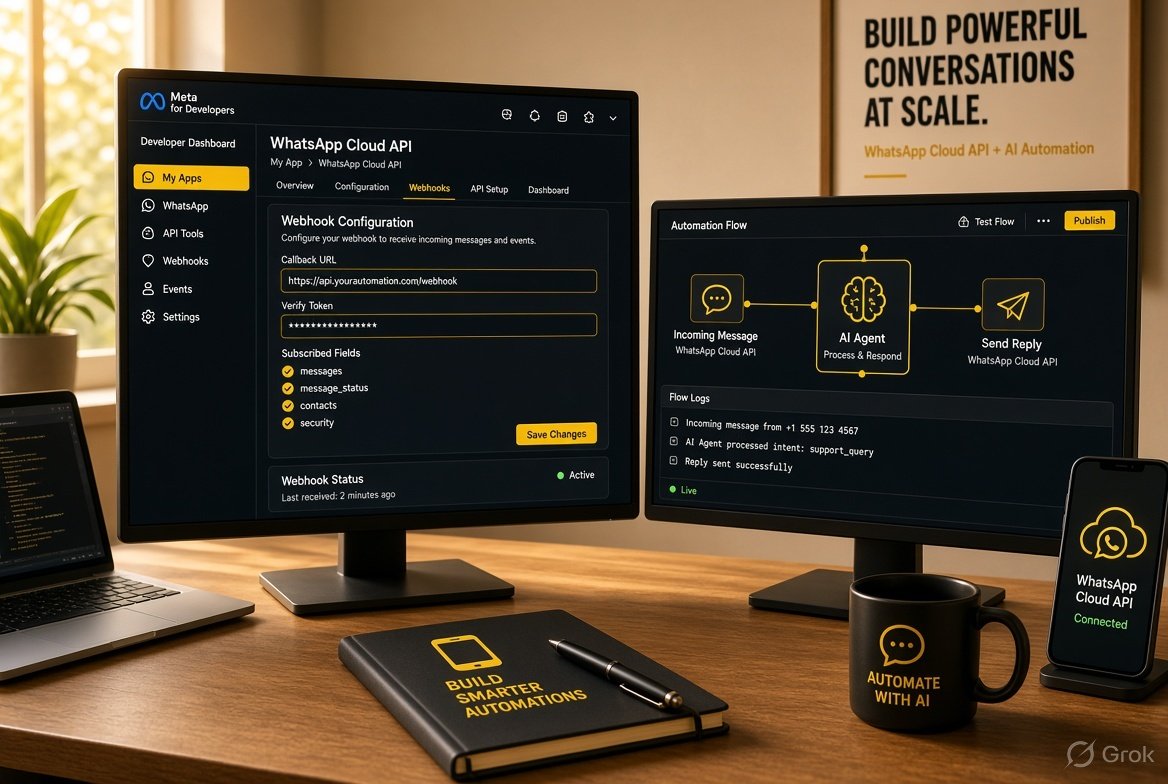
1. Reviewing the Webhook Configuration
The first major troubleshooting step would be reviewing the webhook settings in the Meta developer environment.
A webhook endpoint must be registered correctly so that incoming events can be delivered to the intended destination.
Important configuration details include:
- Correct callback URL.
- Webhook verification token.
- Successful endpoint verification.
- Appropriate event subscriptions.
- Correct application configuration.
- Availability of the receiving endpoint.
Callback URL Verification
The callback URL identifies where incoming event notifications should be delivered.
It must match the webhook endpoint provided by the automation workflow.
Even a small configuration mistake, such as using an outdated URL or an incorrect endpoint, can prevent event delivery.
Verification Token
During webhook setup, the receiving endpoint needs to complete the verification process.
The verification token must match the value configured on both sides.
If the values do not match, the verification process may fail.
Endpoint Accessibility
The receiving endpoint must be accessible to the messaging platform.
A workflow that is inactive or configured with an incorrect endpoint may not receive the expected events.
The developer should also confirm that the correct production or testing endpoint is being used.
2. Checking WhatsApp Application Subscriptions
Webhook registration alone may not be sufficient.
The application also needs to be subscribed to the appropriate WhatsApp business account events.
This is a particularly important area when the client believes that the problem may be related to an application subscription.
The developer would review the business account association and confirm that the application is subscribed to the required messaging events.
The incoming message event subscription is especially important because it enables the application to receive notifications when users send messages.
Other considerations include:
- Correct business account association.
- Appropriate application permissions.
- Correct WhatsApp product configuration.
- Subscription to relevant webhook fields.
- Consistency between the connected account and test number.
If the application is not subscribed to the correct events, the webhook may not receive the expected message notifications even when the callback endpoint itself is available.
3. Troubleshooting the Automation Workflow
Once the external webhook configuration is reviewed, the next step is to inspect the automation workflow.
The incoming-message trigger must be configured correctly and connected to the active workflow.
The developer would verify:
- The trigger’s webhook registration.
- The correct connection with the messaging account.
- Workflow activation status.
- Whether the workflow is listening for incoming events.
- Whether the correct endpoint is registered externally.
- Whether test and production configurations are being mixed.
Test and Production Webhook Differences
One common source of confusion in webhook-based integrations is the difference between testing and production endpoints.
A testing endpoint may only listen while a workflow is actively waiting for a test event.
A production endpoint is generally used by an activated workflow.
If the external application is configured with a testing endpoint while the workflow is expected to operate in production, incoming messages may not be processed as intended.
The developer should confirm that both systems are using the correct corresponding endpoint.
4. Connecting Incoming Messages to the AI Agent
Once the incoming-message trigger is functioning, the next step is ensuring that the message data reaches the AI agent correctly.
The incoming event may contain several fields, including:
- Sender information.
- Message text.
- Message identifier.
- WhatsApp account information.
- Timestamp.
- Message type.
The workflow needs to extract the correct message content and pass it to the AI agent.
For example, if a customer sends a text message asking about a service, the workflow should identify the text field rather than passing unrelated event metadata to the agent.
AI Agent Instructions
The AI agent should have clear instructions describing its purpose and response behavior.
These instructions may define:
- The business it represents.
- Its communication style.
- The types of questions it can answer.
- Information it should use.
- How it should respond when information is unavailable.
- Situations requiring human assistance.
A properly configured agent should provide clear and relevant answers rather than generating unrelated or unsupported information.
Maintaining Conversation Context
For a more useful customer experience, the system may also need to maintain conversation context.
Without context management, the agent may treat every incoming message as a completely new interaction.
For example, if a customer asks a follow-up question, the system should ideally understand how it relates to the previous message.
Conversation memory can be designed around sender identification and suitable session management.
5. Configuring the Outgoing Response
After the AI agent generates a response, the workflow needs to send it back to the customer.
The outgoing messaging component must receive the correct recipient information and generated response.
Important considerations include:
- Correct sender or business phone number identifier.
- Customer’s WhatsApp number.
- Correct message content.
- Appropriate messaging permissions.
- Valid API credentials.
- Compliance with applicable messaging rules.
Since the client had already confirmed that outgoing messaging worked, the existing sending configuration could be reviewed and retained wherever appropriate.
The main objective would be to connect the incoming and outgoing stages into one complete workflow.
6. Testing the Complete Communication Flow
A successful integration should be tested from the customer’s perspective.
It is not enough to confirm that the webhook is registered or that the API returns a message identifier.
The complete process needs to work.
A practical testing sequence would include:
Test 1: Send an Incoming Message
Send a simple text message from an authorized WhatsApp account to the connected test number.
Test 2: Confirm Webhook Delivery
Check whether the incoming event appears in the receiving workflow.
Test 3: Verify Message Extraction
Confirm that the workflow correctly identifies the sender and extracts the message content.
Test 4: Verify AI Processing
Ensure that the AI agent receives the message and generates a relevant response.
Test 5: Confirm Outgoing Delivery
Check that the generated response is sent to the correct WhatsApp recipient.
Test 6: Test Multiple Messages
Send additional messages to confirm that the workflow continues operating correctly.
The final acceptance condition is simple: a customer sends a WhatsApp message, the automation processes it, and the AI agent replies successfully.
7. Moving From a Test Number to a Real Business Number
The client also requested guidance on transitioning from the test number to a real business number.
This is an important consideration because a test environment is useful during development, but businesses generally need a properly configured production account for real customer communication.
The transition may involve several steps.
Business Verification
The business may need to complete the relevant business verification requirements within its Meta business environment.
The exact requirements depend on the account and business circumstances.
Phone Number Registration
A suitable business phone number needs to be registered and connected to the WhatsApp business account.
The number must meet the platform’s eligibility and verification requirements.
Production Configuration
The application should be reviewed for production readiness.
This includes checking permissions, webhook subscriptions, credentials, account associations, and the registered business phone number.
Message Templates and Messaging Rules
Businesses should understand applicable WhatsApp messaging policies, including customer consent, service conversations, and approved message templates where required.
Moving to a real number does not remove the need to follow these requirements.
Final Production Testing
Before using the number for regular customer communication, the complete incoming and outgoing messaging flow should be tested again.
This ensures that the production setup works independently of the earlier test configuration.
The Importance of Screen-Sharing Troubleshooting
The client specifically requested a live screen-sharing session lasting no more than one hour.
This was a practical approach because the existing implementation was mostly complete and the issue appeared to be limited to a particular integration stage.
A focused troubleshooting session would allow the developer to inspect the actual configuration, identify the issue, and demonstrate the correction directly.
The proposed session structure could include:
- Initial review of the existing setup.
- Inspection of webhook registration.
- Verification of application subscriptions.
- Review of workflow activation and endpoint settings.
- Testing incoming message delivery.
- Connecting the AI agent and outgoing response.
- Explaining the underlying issue.
- Demonstrating the complete working flow.
The final explanation is particularly important because the client wanted to understand what went wrong and how to resolve similar issues independently.
This makes the engagement both a technical troubleshooting task and a knowledge-transfer session.
CnEL India’s Approach and Expected Business Benefits
CnEL India focuses on practical AI integration and automation solutions that help businesses improve communication and reduce repetitive manual activities.
For a project like this, our proposed approach would prioritize identifying the actual point of failure instead of rebuilding components that are already functioning.
Our approach would include:
Focused Troubleshooting: Review the existing implementation and isolate the issue affecting incoming message delivery.
Reliable Integration: Ensure that webhook events, automation workflows, AI processing, and outgoing messaging are properly connected.
End-to-End Testing: Verify the complete customer communication journey rather than testing individual components in isolation.
Clear Technical Explanation: Explain the configuration issue in simple terms so the client can understand the solution.
Production Readiness Guidance: Provide an overview of the requirements for transitioning from a test number to a real business number.
The expected business benefits include faster automated responses, improved customer communication, reduced manual handling of routine enquiries, and a stronger foundation for future AI-powered messaging features.
Conclusion
Building a WhatsApp AI agent requires a reliable connection between incoming message events, webhook configuration, automation workflows, AI processing, and outgoing messaging.
This case study highlights a common integration challenge: outgoing messages were being sent successfully, but incoming messages were not reaching the automation system.
The most effective troubleshooting approach is to examine webhook registration, verification, application subscriptions, workflow activation, and endpoint configuration before making unnecessary changes to the existing implementation.
Once incoming events are received correctly, they can be passed to the AI agent and connected to the outgoing messaging process to create a complete two-way communication experience.
The additional transition from a test number to a real business number requires careful attention to account configuration, permissions, phone number registration, messaging policies, and production testing.
CnEL India recognizes the value of reliable AI-powered communication systems for modern businesses. Through structured troubleshooting, practical integration, end-to-end testing, and clear technical guidance, we aim to help businesses turn partially completed automation setups into dependable communication workflows.