
Introduction
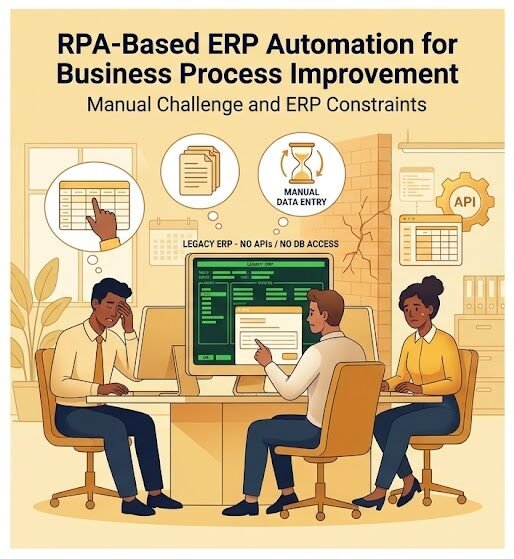
Businesses often rely on enterprise systems to manage important operational processes such as registrations, applications, documentation, customer records, compliance activities, and internal approvals. However, not every enterprise system provides modern integration capabilities. In some cases, an existing ERP system may have no accessible APIs, no direct database access, and no option for modification.
When such systems are critical to daily operations, employees may be required to manually log in, enter information, upload documents, submit applications, and collect generated records. These repetitive activities consume significant time and can also introduce human errors.
CnEL India worked on a project concept focused on solving this type of operational challenge through Robotic Process Automation (RPA). The objective was to automate interactions with an existing ERP entirely through its user interface while keeping the process reliable, recoverable, and protected against duplicate records.
The project required more than basic screen automation. The automation needed to perform a complete business workflow, including login, application creation, company information entry, shareholder and beneficial ownership information, document uploads, submission, and retrieval of registration numbers and generated documents.
The most important requirement was reliability. Every automated process needed to be recoverable if an unexpected issue occurred, while preventing duplicate submissions.
Project Background
The client was working with an existing ERP system that could not be modified and did not provide APIs or direct database access.
This created a significant integration challenge.
Normally, a business application can be connected to another system through structured interfaces. However, when those interfaces are unavailable, the automation layer must interact with the application in the same way a human employee would.
The automation therefore needed to operate through the ERP’s visible user interface.
The business workflow included several important steps:
- Logging into the ERP
- Creating new applications
- Entering company information
- Entering shareholder information
- Entering beneficial ownership details
- Uploading required documents
- Submitting applications
- Reading registration numbers
- Retrieving generated documents
- Recording completed results
- Recovering interrupted workflows
Because the workflow involved business and registration information, accuracy and process control were essential.
Understanding the Business Process
Before developing automation, it was important to understand the complete business process.
RPA projects are most successful when automation is designed around the actual business workflow rather than simply automating individual clicks.
CnEL India’s approach began with process analysis.
The workflow was reviewed from the initial application stage through final registration and document retrieval. Each step was considered in terms of inputs, actions, outputs, possible errors, and dependencies.
The analysis focused on questions such as:
- What information is required for each application?
- Which fields must be completed?
- Which documents are required?
- What happens if information is missing?
- How does the ERP indicate a successful submission?
- Where can the process fail?
- How can an interrupted workflow continue safely?
- How can duplicate submissions be prevented?
- Where should completed information be recorded?
- What should happen when the ERP behaves unexpectedly?
This process analysis created a foundation for designing reliable automation.
UI-Based ERP Automation
Since the ERP did not provide APIs or database access, the automation had to operate through its user interface.
This meant the automated process needed to behave similarly to a trained employee.
The automation could navigate through screens, interact with fields, select options, upload documents, submit forms, and read information displayed by the ERP.
However, UI-based automation is more complex than simply reproducing a fixed sequence of clicks.
Web pages and enterprise applications can behave differently depending on loading times, validation messages, session states, or unexpected changes. Therefore, the automation needed to be designed with appropriate checks and recovery mechanisms.
The objective was to make the workflow resilient rather than dependent on perfect execution every time.
Application Creation Workflow
One of the central requirements was the automated creation of applications.
The process begins when the automation receives the required information for a new application.
It then navigates to the appropriate section of the ERP and begins entering the required information.
The workflow can include:
- Opening the application process.
- Entering company information.
- Entering shareholder information.
- Entering beneficial ownership information.
- Validating required fields.
- Uploading supporting documents.
- Reviewing the entered information.
- Submitting the application.
- Capturing the resulting registration information.
- Retrieving generated documents.
Each stage needs to be completed correctly before moving to the next stage.
This structured workflow helps reduce incomplete submissions and makes the automation easier to monitor.
Handling Company and Ownership Information
Company and ownership information can contain multiple fields and relationships.
The automation therefore needs to handle structured information carefully.
Company details may include organization-level information, while shareholder and beneficial ownership information may involve multiple individuals or entities.
A reliable automation process needs to understand these relationships and enter the information into the appropriate sections of the ERP.
Validation is particularly important at this stage.
If required information is missing or incorrectly formatted, the automation should identify the issue rather than blindly continuing.
This helps reduce failed applications and unnecessary rework.
Document Upload Automation
Document handling was another important component of the workflow.
Applications often require supporting documents that must be uploaded before submission.
The automation needs to identify the appropriate documents, associate them with the correct application, and upload them to the relevant sections of the ERP.
Document handling also introduces additional risks.
A file could be missing, incorrectly named, unavailable, or associated with the wrong application. Therefore, the automation should perform appropriate checks before proceeding.
The process should also verify that the upload was successfully completed before moving forward.
This type of validation improves reliability and reduces the risk of incomplete submissions.
Submission and Registration Number Retrieval
After all required information and documents have been entered, the application can be submitted.
Submission is one of the most sensitive points in the workflow because an accidental duplicate submission can create operational and administrative problems.
The automation therefore needs to determine whether an application has already been submitted before attempting the action again.
Once the ERP confirms successful submission, the automation can capture the registration number or other confirmation information.
This information becomes an important reference for tracking the application and retrieving related documents.
Duplicate Prevention
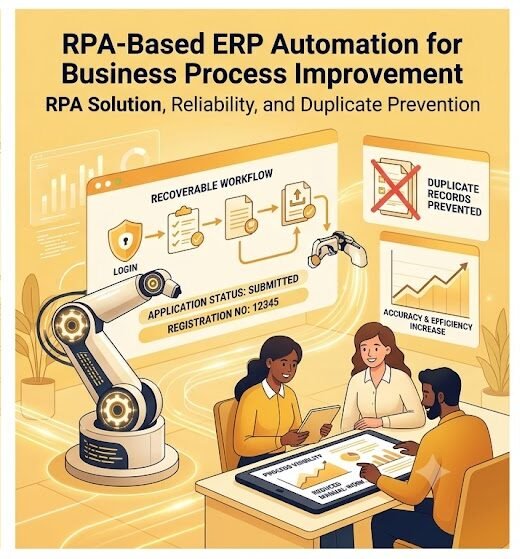
Preventing duplicate records was one of the most important requirements of the project.
In automated workflows, interruptions can create uncertainty.
For example, an automation may submit an application successfully but fail before recording the registration number. If the workflow is simply restarted from the beginning, it could attempt to create the same application again.
To prevent this, the automation process needs a reliable state-management approach.
Each application should have a unique reference or identifying information that allows the system to determine its current status.
Possible states can include:
- Not started
- In progress
- Documents pending
- Ready for submission
- Submitted
- Registration completed
- Documents retrieved
- Failed
- Requires review
By tracking these states, the automation can determine where a workflow stopped and continue from the appropriate point instead of restarting blindly.
Recoverable Automation
Recoverability was another core requirement.
Automated workflows can encounter unexpected situations such as session expiration, page-loading problems, validation errors, network interruptions, or changes in application behavior.
A reliable RPA system should be able to handle such situations gracefully.
CnEL India’s approach emphasizes designing automation workflows with checkpoints.
After important stages, the process can record its current state. If an interruption occurs, the workflow can identify the last successfully completed stage and continue from there.
For example, if all documents have been uploaded but the submission step has not yet been completed, the automation should not repeat the entire application process.
Instead, it should recognize the existing progress and resume from the appropriate point.
This approach improves efficiency and significantly reduces the risk of duplicate records.
Error Handling
Error handling is essential for business-critical automation.
Not every issue should result in the entire workflow stopping without explanation.
The automation should distinguish between different types of errors.
Examples include:
- Missing information
- Missing documents
- Invalid data
- Unexpected screen
- Session timeout
- Failed upload
- Submission failure
- Temporary system unavailability
- Unexpected application response
Depending on the situation, the workflow can retry an action, pause for review, continue from a checkpoint, or mark the application for manual intervention.
This provides greater control over the automation process.
Process Monitoring and Visibility
Automation should not become a black box.
Businesses need visibility into what happened during each workflow.
A well-designed automation process can maintain records of important activities such as:
- Application reference
- Start time
- Current status
- Completed stages
- Submission status
- Registration number
- Document retrieval status
- Errors encountered
- Retry attempts
- Final outcome
This information helps operational teams monitor automation and investigate issues when required.
It also creates a useful history of completed activities.
Process Optimization
The project was not limited to automating manual actions. It also involved identifying opportunities to improve the overall process.
Process analysis can reveal unnecessary steps, repeated data entry, inefficient handoffs, and points where manual intervention can be reduced.
By mapping the workflow from beginning to end, CnEL India can identify which activities are suitable for automation and which should remain under human supervision.
This creates a balanced automation model.
The objective is not to automate every possible action. Instead, the goal is to automate repetitive and predictable work while keeping human involvement where judgment or exception handling is necessary.
Reliability and Quality Control
Reliability is especially important when automation interacts with registration or business-critical systems.
The automation should not simply complete a workflow under ideal conditions. It should also respond appropriately when conditions are different.
Quality control therefore includes testing normal workflows as well as unusual scenarios.
Testing can cover:
- Correct application data
- Multiple shareholders
- Multiple ownership records
- Required and optional documents
- Missing information
- Incorrect inputs
- Failed uploads
- Interrupted sessions
- Repeated execution
- Successful submissions
- Registration number retrieval
- Document retrieval
- Recovery after interruption
Testing these scenarios helps identify weaknesses before the automation is used extensively.
Collaboration With Stakeholders
Successful RPA implementation requires close collaboration between developers and business stakeholders.
Business users understand the actual operational process, while the development team understands how to convert that process into reliable automation.
CnEL India’s approach encourages clear communication throughout the project.
Stakeholders can explain existing procedures, exceptions, compliance requirements, and common operational problems. The development team can then translate those requirements into structured automation workflows.
This collaboration helps ensure that the final automation reflects real business operations rather than an idealized process.
Flexible Engagement Models
The project also required consideration of different engagement models.
CnEL India can support automation requirements through project-based development, dedicated development teams, or staff augmentation depending on the client’s needs.
A project partnership can be suitable when the client has a clearly defined automation requirement.
A dedicated team can be useful when multiple automation workflows need to be developed and maintained over time.
Staff augmentation can help organizations that already have internal teams but require additional RPA development capacity.
This flexibility allows automation support to be aligned with project size, timeline, and business requirements.
Business Benefits
A reliable UI-based automation solution can provide several benefits.
Reduced Manual Work
Employees no longer need to perform every repetitive ERP interaction manually. This allows them to focus on higher-value activities.
Improved Accuracy
Structured automation reduces manual data-entry errors and ensures that predefined workflows are followed consistently.
Faster Processing
Automated workflows can execute repetitive tasks more quickly than manual processing.
Better Process Visibility
Tracking application status and workflow results provides greater operational visibility.
Reduced Duplicate Risk
State tracking and submission checks help prevent duplicate records and repeated applications.
Recoverability
Checkpoint-based workflows make it possible to continue interrupted processes without restarting everything.
Scalability
Once a reliable workflow is established, the organization can process a larger number of applications without increasing manual effort at the same rate.
Challenges
The biggest challenge in this project was the lack of direct system integration.
Without APIs or database access, the automation had to depend on the ERP’s user interface. This makes reliability more challenging because the workflow must respond to visible application behavior.
Another challenge was handling complex application information, including company, shareholder, and beneficial ownership data.
Document management also required careful validation.
The most significant operational challenge, however, was ensuring that interrupted workflows could be recovered without creating duplicate applications.
These challenges required a process-focused and reliability-oriented approach rather than simple task automation.
CnEL India’s Approach
CnEL India approaches RPA projects by combining process understanding, automation design, validation, monitoring, and continuous improvement.
The overall workflow can be summarized as:
Process Analysis → Workflow Design → Automation Development → Validation → Error Handling → Recovery → Monitoring → Optimization
This approach helps transform repetitive manual processes into structured automated workflows.
The focus remains on business outcomes rather than automation for its own sake.
Conclusion
This RPA project demonstrates how automation can help businesses improve processes even when an existing ERP does not provide modern integration options.
By interacting directly with the ERP interface, automation can handle repetitive activities such as application creation, data entry, document uploads, submissions, registration number retrieval, and document collection.
However, reliable automation requires much more than reproducing human clicks. It requires process analysis, validation, error handling, state tracking, recovery mechanisms, duplicate prevention, monitoring, and continuous optimization.
CnEL India’s approach focuses on building automation that is practical, recoverable, and aligned with real business workflows.
For organizations managing large volumes of repetitive ERP or government-related processes, this approach can reduce manual workload, improve consistency, accelerate processing, and provide a scalable foundation for future automation initiatives.