
Introduction
Modern B2B SaaS applications need to do more than provide powerful functionality. They also need to offer a clear, consistent, responsive, and easy-to-use interface. Business users often work with dashboards, reports, navigation menus, forms, tables, settings, and multiple workflows throughout the day. If these elements are poorly organized, even a technically strong application can become difficult to use.
CnEL India’s SaaS UI/UX development approach focuses on creating interfaces that combine visual quality with usability, consistency, accessibility, and maintainability.
This case study focuses on a confidential B2B SaaS application that required a polished application shell and a representative application screen. The client had purchased a commercial design resource and wanted it adapted to the application’s specific requirements. Rather than simply reproducing the design resource, the goal was to use its components as a foundation and compose them according to the application’s actual structure and interaction requirements.
The initial assignment was designed as a paid pilot milestone. It included the creation of the main application shell, one representative screen, responsive desktop and mobile layouts, reusable frontend components, consistent visual styling, keyboard accessibility, and a clean handoff that could later be integrated into the larger application.
The project demonstrates how a structured UI/UX implementation can establish a strong foundation for a larger SaaS product.
Understanding the Project
The client was developing a confidential B2B SaaS product and wanted to validate the quality of the frontend implementation before moving forward with additional screens.
Instead of immediately developing the complete application, the client defined a smaller pilot milestone.
This approach provided an opportunity to evaluate:
- Visual implementation quality
- Responsive behavior
- Component reusability
- Interaction states
- Accessibility
- Code organization
- Integration readiness
- Development quality
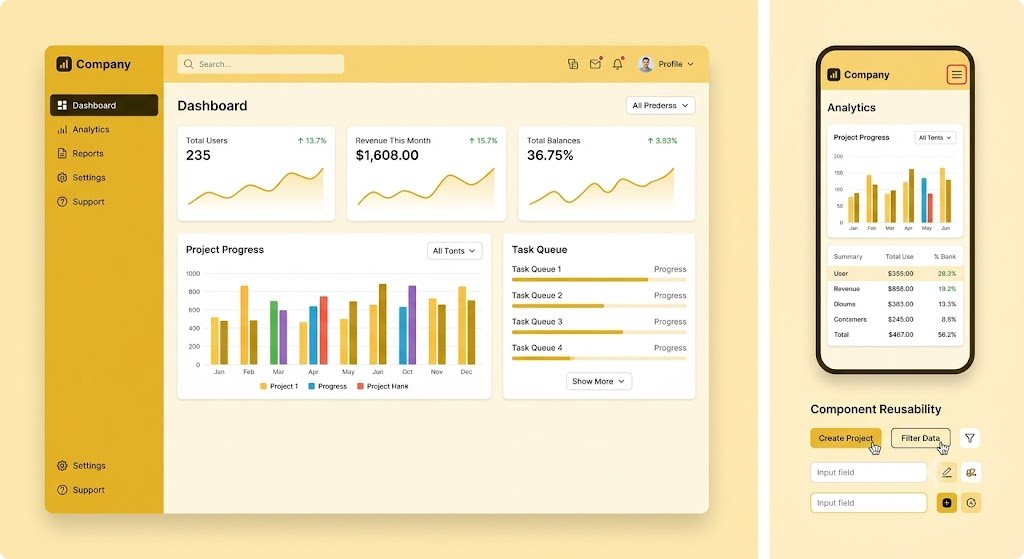
The pilot included an application shell consisting of the sidebar, header, navigation, and main content layout. One representative screen also needed to be implemented to demonstrate how the overall interface would work in a real application.
The project was intentionally structured around sanitized references and synthetic data. Production systems, customer information, backend systems, and credentials were outside the scope of the assignment.
This created a controlled development environment while allowing the frontend quality to be evaluated realistically.
Project Objectives
The main objective was to transform an existing commercial design resource into a practical and reusable SaaS application interface.
The project had several important goals.
1. Create a Professional Application Shell
The application shell needed to establish the basic structure of the SaaS product.
This included the main sidebar, top header, navigation areas, and content region.
The shell needed to feel balanced and organized so that future screens could be added without requiring the overall structure to be redesigned.
2. Develop a Representative Screen
A single representative screen was required as part of the initial milestone.
This screen would demonstrate how the design system worked when applied to real application content.
It would also provide a practical reference for future screens.
3. Ensure Responsive Design
The application needed to work across desktop and mobile screen sizes.
The desktop layout could make use of wider navigation and larger content areas, while the mobile version needed to adapt the same functionality to a smaller display.
Responsive behavior therefore had to be considered throughout the implementation rather than added at the end.
4. Build Reusable Components
The client specifically required reusable frontend components.
This was important because a SaaS application normally contains many screens with repeated interface elements.
Instead of creating each page independently, common elements should be structured so they can be reused across the application.
5. Maintain Accessibility
Controls needed to support keyboard interaction and provide visible focus states.
Accessibility was therefore treated as part of the implementation rather than an optional enhancement.
Understanding the Design Resource
The client provided access to a purchased commercial design kit.
However, the design kit itself was not considered the complete application design.
It served as a collection of reusable visual components and patterns.
The supplied application references defined how those components should be combined for the actual SaaS product.
This distinction was important.
A direct copy of a design kit may look visually accurate but still fail to address the specific needs of the application.
The implementation therefore required interpretation.
The components needed to be adapted to the application’s navigation, content hierarchy, spacing requirements, interaction behavior, and responsive structure.
This allowed the final interface to maintain a professional visual language while remaining appropriate for the product.
Designing the Application Shell
The application shell was the foundation of the project.
A well-designed shell gives users a consistent experience as they move between different sections of a SaaS application.
Sidebar
The sidebar provides access to major application areas.
It needed to be organized clearly so users could understand where they were and where they could go next.
Navigation items needed consistent spacing, typography, icons, and active states.
The design also needed to account for the mobile experience, where a permanent sidebar may not be practical.
Header
The header provides important contextual and functional information.
It can contain navigation controls, page context, account-related actions, notifications, or other application functions.
The header needed to visually connect with the sidebar and content area without competing for attention.
Main Content Area
The content area is where the application’s primary work takes place.
The layout needed sufficient spacing to prevent information overload while maintaining efficient use of screen space.
A consistent content structure also makes it easier to build future screens.
Building the Representative Screen
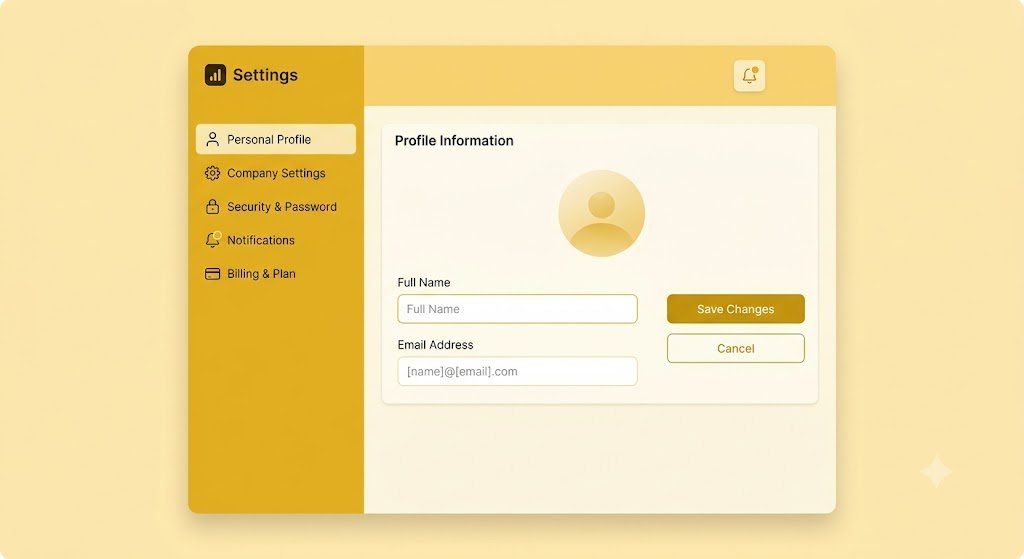
The representative screen was an important part of the pilot because it demonstrated how the application shell and design system worked together.
The screen needed to follow the approved references while remaining flexible enough to support future content.
Instead of hardcoding every visual element independently, the implementation could be structured around reusable patterns.
For example, repeated interface elements could follow common rules for:
- Typography
- Spacing
- Buttons
- Form controls
- Cards
- Navigation states
- Alerts
- Content sections
- Interactive states
This created a foundation that could later be expanded across the application.
Responsive Design
Responsive behavior was one of the major requirements of the project.
B2B SaaS users may access applications from large desktop monitors, laptops, tablets, and mobile devices.
The interface therefore needed to adapt to different screen sizes without losing its usability.
On larger screens, the application could make effective use of the available horizontal space.
On smaller screens, navigation and content areas needed to be reorganized.
Important considerations included:
- Flexible content widths
- Responsive navigation
- Mobile-friendly controls
- Appropriate spacing
- Readable typography
- Touch-friendly interaction areas
- Proper handling of long content
- Consistent visual hierarchy
The goal was not simply to shrink the desktop design.
Instead, the interface needed to respond intelligently to the available screen size.
Component Reusability
Reusable components were a central requirement of the project.
In a SaaS application, creating separate versions of the same interface element for every screen can lead to inconsistency and unnecessary maintenance.
A reusable component approach allows common elements to follow the same design rules.
For example, if the application uses a standard button style, that style should remain consistent throughout the product.
The same principle applies to navigation items, cards, forms, headings, input fields, status indicators, and other interface elements.
This approach provides several benefits.
First, it improves consistency.
Second, it reduces duplication.
Third, it makes future development faster.
Fourth, it makes design changes easier to manage.
If a common component needs to be updated, the change can be reflected wherever that component is used.
Separating Presentation and Application Logic
The client also required a clear separation between presentation components, data access, and business logic.
This is an important architectural principle for maintainable SaaS applications.
The visual layer should focus on displaying information and responding to user interaction.
Business logic should remain separate.
Similarly, data access should not be unnecessarily embedded inside visual components.
This separation makes the application easier to maintain and allows the interface to work with the supplied mock data during the pilot.
It also prepares the frontend for later integration with real application services.
Working With Synthetic Data
Because the product was confidential, the development environment used sanitized references and synthetic data.
This allowed the frontend implementation to demonstrate realistic behavior without exposing sensitive customer or production information.
Synthetic data also helped establish predictable examples for interface testing.
The team could evaluate how the screen behaved with different content lengths, values, states, and user scenarios.
This was particularly useful for checking whether the layout remained stable under different conditions.
Accessibility Considerations
Accessibility was another important acceptance criterion.
The application controls needed to support keyboard interaction.
Users should be able to move through interactive elements without depending entirely on a mouse or touch input.
Visible focus states were also required.
This makes it easier for keyboard users to understand which element is currently active.
Accessibility improvements also tend to benefit general usability.
Clear focus indicators, logical navigation order, readable text, and consistent interaction patterns can make an interface easier for many different types of users.
Interaction States
A polished SaaS interface needs to communicate what is happening.
Controls cannot simply have one appearance.
Buttons, navigation elements, inputs, and other interactive components may need different states depending on user actions.
These can include:
- Default
- Hover
- Focus
- Active
- Disabled
- Selected
- Loading
- Error
- Success
Including these states makes the application feel complete and predictable.
It also reduces confusion because users receive visual feedback when they interact with the interface.
Quality Assurance
Before handoff, the implementation needed to satisfy several acceptance criteria.
The code needed to build and run using the documented setup instructions.
The application shell and representative screen needed to match the approved references.
Desktop and mobile layouts needed to work at the agreed screen sizes.
Keyboard interaction and focus states needed to be verified.
The implementation also needed to avoid unnecessary dependencies or external services.
This type of structured validation helps identify issues before the frontend is integrated into the larger product.
Development Workflow
CnEL India’s approach to a project like this begins with understanding the provided references and project structure.
The first stage involves reviewing the visual direction, application requirements, component list, and interaction expectations.
The next stage focuses on establishing the application shell.
Once the shell is stable, the representative screen can be implemented within that structure.
Responsive behavior is then reviewed across different screen sizes.
Reusable components and interaction states are refined throughout the process.
Finally, the complete pilot is tested against the acceptance criteria before handoff.
This approach reduces unnecessary rework and creates a clear foundation for future development.
Expected Business Benefits
A successful SaaS interface implementation can provide several long-term benefits.
Better User Experience
A clean interface helps users understand the application more quickly and complete tasks with less confusion.
Stronger Brand Perception
A polished interface can make a B2B SaaS product appear more professional and trustworthy.
Faster Future Development
Reusable components reduce the time required to build additional screens.
Better Consistency
A shared design structure ensures that new sections follow the same visual language.
Easier Maintenance
Separating presentation from business logic makes future changes easier to manage.
Improved Accessibility
Keyboard support and visible focus states make the application more usable for a wider range of users.
Better Integration Readiness
A clean frontend structure can make it easier to connect the interface with real application services later.
Conclusion
This SaaS UI/UX project demonstrates the importance of combining design accuracy with practical frontend engineering.
The objective was not simply to reproduce a purchased design resource. The real challenge was to transform that visual foundation into a structured, responsive, reusable, and accessible application interface suitable for a confidential B2B SaaS product.
The initial pilot milestone provided a controlled way to validate the quality of the application shell and representative screen before expanding the project.
Through a carefully structured sidebar, header, navigation system, content layout, responsive design, reusable components, interaction states, accessibility support, and clean separation of presentation and application logic, the project established a strong foundation for future SaaS development.
For CnEL India, this type of project represents an approach where design and development work together rather than being treated as separate activities.
A successful SaaS product needs an interface that looks professional, feels intuitive, works across devices, and can evolve as the product grows.
The result is not just a visually improved application. It is a scalable frontend foundation that can support additional screens, workflows, and product functionality while maintaining a consistent and professional user experience.
Ultimately, the project demonstrates how a focused pilot can reduce development risk, validate design and implementation quality, and establish the foundation for a larger B2B SaaS product.